
Hello, I am just curious if I need to schedule the first assignment review meeting, or if I will be contacted when the packet has arrived and is ready for review?
You schedule it yourself as soon as you receive our invitation, well before your Academic Packets arrive. When your completed assessments reach your advisor, we send you an email that does two things at once: it confirms we received your assessments, and it tells you the date your advisor will begin working on your students’ evaluations and Academic Packets. That email, titled “Action Required: We have received your assessments. Please schedule a planning meeting,” is your invitation to schedule, and it carries the one date you need. Choose your appointment for any day after it.
No second email will arrive announcing that your packets are finished and it is time to book. Your packets are prepared for the appointment you have already chosen, and they reach you before you sit down with your advisor.
The meeting you are asking about is the annual Course of Study Planning Appointment. Families call it many things: the planning meeting, the packet review, the first advisor meeting. They are all the same appointment.
Your year begins in eight steps
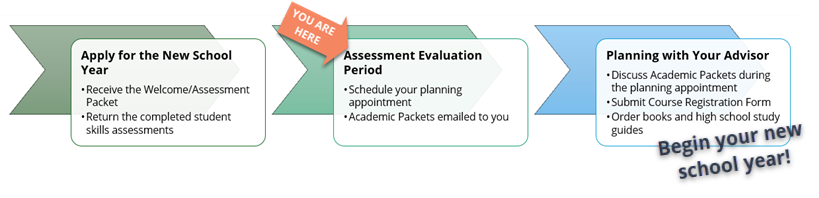
Why the scheduling comes first
The order surprises many new families, and there is a reason for it. Your appointment date is part of what tells your advisor when your family’s packets are needed. Choosing your day early is what puts your family in the queue; waiting for the packets before booking only pushes your own meeting later.
Finding your date
Your date is particular to your family, so please use the one in your own invitation email rather than a date a friend was given. It is the date named as the day your advisor begins the evaluations. Any day after it is open to you.
If you cannot find your invitation email, look in your spam folder first, then write to us. We will resend it, and we can tell you your date over email.
How to book
Go to the appointment scheduler and create a free Acuity Scheduling account. The account creation is worth the five minutes: it keeps your enrollment package codes and your appointments together, so you are not hunting for a code every time you book (your enrollment package codes are printed on your Web Logins page, which you can reprint from your private family folder as needed). Select a Course of Study Planning Appointment for your chosen day. If you have four or more students enrolled, schedule a second appointment as well, at least one day apart from the first, so there is room to talk about every student without rushing.
The planning appointment is included in your enrollment. When you book, apply your enrollment package code rather than entering a credit card, and confirm that the total reads $0.00 before you complete the booking. If you are signed in to your Acuity account, your available codes appear on their own.
If you would rather we schedule it for you
We cannot create an Acuity Scheduling account on your behalf, meaning the account is yours to set up; our article Appointment Scheduler (Create a Free Acuity Scheduling Account) walks you through it in a few minutes. We are glad to book the appointment itself for you, though. Write to us with your full name, the appointment you would like, and your time zone, and a staff member will schedule it and send you the confirmation.
A note for high school families
If you have a high school student and want to talk about live classes, that is a separate conversation with the high school advisor, and you do not have to wait for your planning appointment to have it. Schedule the live class consultation on its own. It does not take the place of your Course of Study Planning Appointment, so please book both.
Resources and Related Reading
- Schedule your Course of Study Planning Appointment
- Appointment Scheduler (Create a Free Acuity Scheduling Account)
- What happens once we sign up with St. Thomas Aquinas Academy?
- Ready for your own Academic Packet?
- Schedule a high school live class consultation
- STAA Online Shop, for study guides and course materials
- STAA Handbook, Part 1: Parent Resources — available on the Student Zone at staahomeschool.com/handbook.